DNS
Why configure DNS
DNS hijacking or an unstable resolver can prevent websites from opening and interfere with strategy testing. You can check which resolvers are in use at browserleaks.com/dns.
On Android 9 and newer, it is recommended to configure DNS over TLS at the system level. If working DoT or DoH is already configured in the operating system, select system DNS in ByeByeDPI.
Note
The DNS field in ByeByeDPI accepts an IPv4 DNS address. Configure DoT and DoH at the system level or in an application that supports them. Strategy testing uses system DNS.
If DoT or DoH is not an option
If you cannot or do not want to configure DoT or DoH, try another DNS address in ByeByeDPI or select system DNS.
Regular DNS queries are not encrypted and are less protected against interception or modification than DoT and DoH.
DNS over TLS
Configure a private DNS hostname in the system:
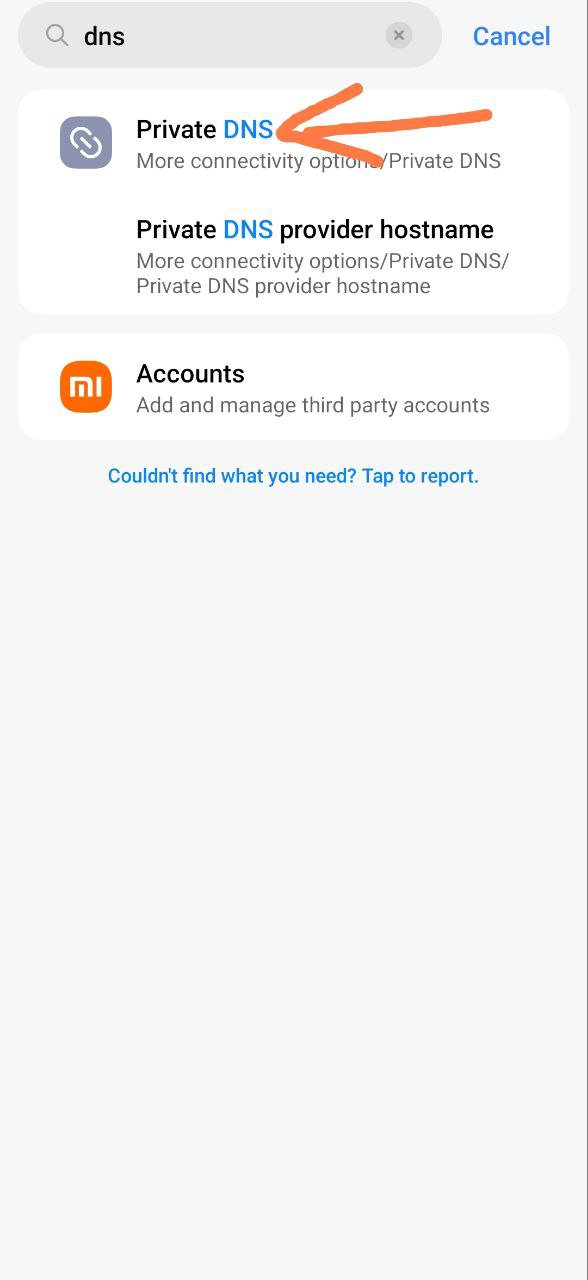
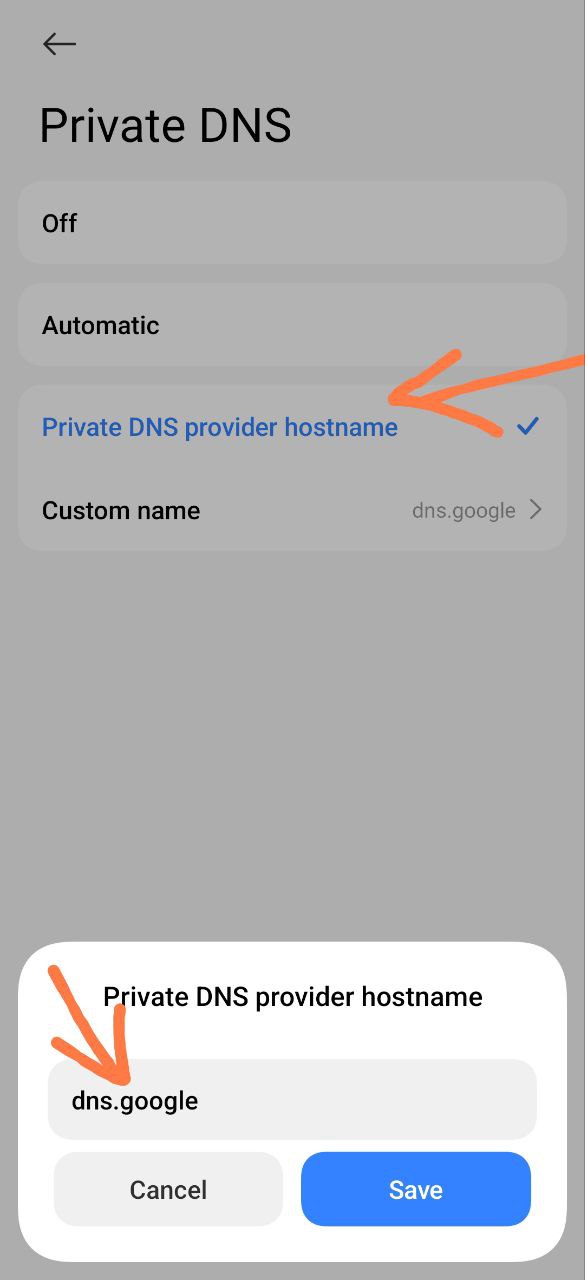
Regular resolvers:
dns.googleone.one.one.onedns.quad9.netdot.sbunfiltered.adguard-dns.comdns.adguard-dns.com
DNS over HTTPS
Regular resolvers:
https://dns.google/dns-queryhttps://cloudflare-dns.com/dns-queryhttps://dns.quad9.net/dns-queryhttps://doh.dns.sb/dns-queryhttps://doh.opendns.com/dns-queryhttps://dns.adguard-dns.com/dns-query
DoH is usually configured in a browser or a separate application. Android does not provide a single system-wide DoH setting equivalent to Private DNS for DoT.
DNS instability in Russia
For some users in Russia, Google, Cloudflare, and some other DNS resolvers, including DoH and DoT, may be unstable or unavailable.
If websites stop opening or you see a DNS error, try another resolver. If working DoH or DoT is already configured in the operating system, select system DNS in ByeByeDPI.
Warning
Some resolvers filter advertising, adult content, or other website categories. This may look like a ByeByeDPI problem.
Proxying DNS
Proxying DNS differs from a regular resolver: it may help with geographic restrictions imposed by individual services, such as AI services. It does not replace ByeByeDPI and cannot bypass an allowlist.
DoH resolvers for services with geographic restrictions:
https://xbox-dns.ru/dns-queryhttps://dns.comss.one/dns-queryhttps://dns.malw.link/dns-query
DoT resolvers for services with geographic restrictions:
xbox-dns.rudns.comss.onedns.malw.link
Caution
Use only resolvers you trust. A proxying resolver may be unstable, so avoid setting it system-wide unless necessary: if it goes down, access to websites may stop working.
Read more about Comss DNS on the project page.
Additional public lists: